
HeliTach2.3 - App Store
You'll be able to see results in few seconds.
Publisher Description
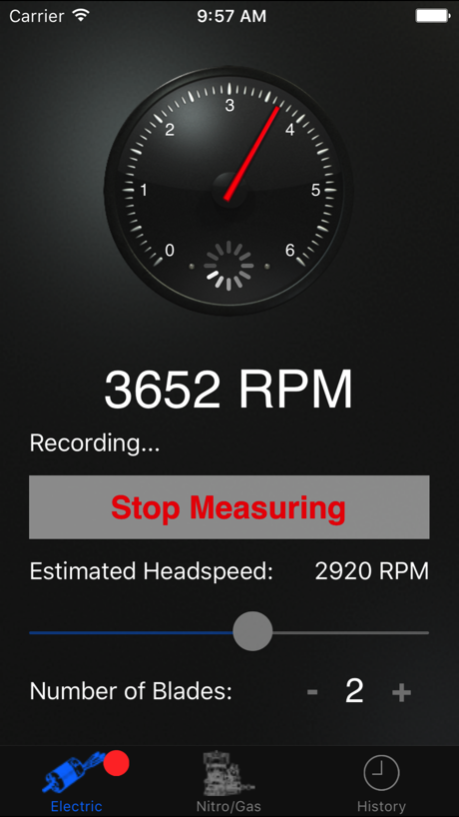
IMPORTANT: Make sure HeliTach has permission to use your device's microphone. It will ask the first time it's launched, but you can also change the setting in your device's privacy settings.
HeliTach is an acoustic tachometer for radio controlled helicopters. It works by recording an audio sample of the helicopter and using an algorithm to analyze the sound of the helicopter's blades or engine. HeliTach uses an FFT algorithm written by Stephan M. Bernsee of The DSP Dimension.
HeliTach has an "Electric" mode that listens to the sound of the blades and a "Nitro/Gas" mode that listens to the engine RPM to measure headspeed. The "Electric" mode can work with nitro/gas helicopters but not vice versa. Set the settings for the applicable mode, press "Measure Headspeed," and set the iPhone on the ground near the helicopter. Spool up and hover a few feet away from the iPhone to get a couple good measurements. The "History" tab shows all measurements taken in addition to the measurement displayed on the main tab.
HeliTach records and processes audio samples continuously until the user tells it to stop and displays the measurement with the highest value or strongest signal. It has been tested with 250, 450 and 500-size electric helicopters with success. The results have been verified by comparison to an optical tachometer.
I can't guarantee accurate results on all helicopters, nor can I be held responsible for personal injury or damage to your iPhone or helicopter.
Requires an external microphone for devices without one built in, e.g. an early model iPod Touch.
Jun 12, 2017
Version 2.3
This app has been updated by Apple to display the Apple Watch app icon.
Support for 64-bit iOS
About HeliTach
The company that develops HeliTach is Jacob Niehus. The latest version released by its developer is 2.3.
To install HeliTach on your iOS device, just click the green Continue To App button above to start the installation process. The app is listed on our website since 2017-06-12 and was downloaded 0 times. We have already checked if the download link is safe, however for your own protection we recommend that you scan the downloaded app with your antivirus. Your antivirus may detect the HeliTach as malware if the download link is broken.
How to install HeliTach on your iOS device:
- Click on the Continue To App button on our website. This will redirect you to the App Store.
- Once the HeliTach is shown in the iTunes listing of your iOS device, you can start its download and installation. Tap on the GET button to the right of the app to start downloading it.
- If you are not logged-in the iOS appstore app, you'll be prompted for your your Apple ID and/or password.
- After HeliTach is downloaded, you'll see an INSTALL button to the right. Tap on it to start the actual installation of the iOS app.
- Once installation is finished you can tap on the OPEN button to start it. Its icon will also be added to your device home screen.
Program Details
System requirements
Download information
Pricing
Version History
version 2.3
posted on 2017-06-12
Jun 12, 2017 Version 2.3
This app has been updated by Apple to use the latest Apple signing certificate.
Support for 64-bit iOS
version 2.3
posted on 2017-06-12
Jun 12, 2017 Version 2.3
Support for 64-bit iOS
version 2.3
posted on 2017-06-12
Jun 12, 2017 Version 2.3
This app has been updated by Apple to display the Apple Watch app icon.
Support for 64-bit iOS
version 2.2
posted on 2009-07-18
Disclaimer
Official App Store Link
We do not host HeliTach on our servers. We did not scan it for viruses, adware, spyware or other type of malware. This app is hosted by Apple and passed their terms and conditions to be listed there. We recommend caution when installing it.
The App Store link for HeliTach is provided to you by apps112.com without any warranties, representations or guarantees of any kind, so access it at your own risk.
If you have questions regarding this particular app contact the publisher directly. For questions about the functionalities of apps112.com contact us.
